
Source Material Specs for DCP Authoring
On this page+
Which service are you ordering?
Instant DCP
- What you deliver
- One file with the audio embedded (QuickTime preferred)
- Codec
- Apple ProRes 422 (HQ recommended); H.264 also accepted
- Resolution
- 2K or 4K, any aspect ratio; fit to flat or scope, never cropped
- Frame rate
- 23.976, 24, 25, 29.97 or 30 fps
- Audio
- One embedded stream: 2-channel stereo or 6-channel 5.1
- Subtitles & captions
- Burned into the picture
- Color
- Rec-709, gamma 2.4
- Price
- $10/min ($99 minimum)
- Turnaround
- Typically under 24 hours
Custom DCP
- What you deliver
- QuickTime master; surround mixes as separate mono files
- Codec
- Apple ProRes 422 or 10-bit uncompressed
- Resolution
- 2K or 4K, any aspect ratio; fit to flat or scope, never cropped
- Frame rate
- 23.976, 24, 25, 29.97 or 30 fps
- Audio
- Stereo, 5.1, 7.1 or Atmos; surround as labeled mono WAV/AIFF
- Subtitles & captions
- Timed-text tracks created from your subtitle files
- Color
- Rec-709, DCI-P3 or XYZ (labeled)
- Price
- $300 flat shorts · $15–20/min features
- Turnaround
- 3–5 business days
Instant DCP: export one file
The Instant pipeline reads exactly one file: your picture and a single audio stream together in one movie file. There is one upload, so separate audio files cannot be accepted on this service. Every upload is checked automatically, and a file that doesn't match gets sent back for a re-export, which costs you a round trip. Export it right the first time:
- QuickTime (.mov) encoded as Apple ProRes 422 is preferred. HQ is the safe default, and it's the one we can promise won't delay your order or shift colors.
- H.264 is accepted too — Premiere's H.264 preset, or any .mp4 with the audio embedded. It's a delivery codec rather than a mastering one, so export at the highest bitrate your settings allow; ProRes holds up better projected.
- One embedded, interleaved audio stream: 2-channel stereo, or 6-channel 5.1 in SMPTE channel order (L, R, C, LFE, Ls, Rs). Uncompressed PCM, 24-bit, 48 kHz.
- Not two mono tracks, not separate stems, not 8 channels. If your theatrical 5.1 lives in channels 1–6 of an 8-channel master, export just those six.
- Frame rate: 23.976, 24, 25, 29.97 or 30 fps.
- Any aspect ratio is fine: we fit your picture into the best DCP container, flat or scope, adding pillar- or letter-boxing as needed. We never crop your film.
- Runtime must match what you enter at checkout, within 2 minutes either way.
- Subtitles must be burned into the picture.
- No slates, bars and tone, or countdowns. Deliver the program only, starting on the first frame of picture; a countdown left on the head becomes part of your DCP.
- Export in Rec-709, gamma 2.4, the standard for HD video. If your grade lives in DCI-P3 or XYZ, use Custom DCP so an engineer handles the conversion.
- If your 5.1 mix carries LFE, low-pass it (roughly 24–48 dB roll-off above 125–160 Hz).
A note on 5.1 channel order: some audio tools, Pro Tools among them, default to a film order of L, C, R, Ls, Rs, LFE instead of SMPTE. Nothing in the file records which convention was used, so we can't detect a mismatch. Deliver in SMPTE order. Getting this wrong puts your dialogue in the right-hand speaker.
Premiere Pro export settings
- Open the Export tab (Cmd+M / Ctrl+M).
- Format: QuickTime. H.264 also works if that's what you have — keep the bitrate as high as the preset allows. Its audio section offers AAC rather than Uncompressed, which is fine: set 48000 Hz and the channel layout below.
- Video section: Video Codec set to Apple ProRes 422 HQ. Leave Frame Size and Frame Rate on Match Source and Quality at 100.
- Audio section: Audio Codec Uncompressed, Sample Rate 48000 Hz, Sample Size 24 bit. Under Audio Channel Configuration you want exactly one stream, with Output Channels set to Stereo. For a 5.1 master your sequence must be 5.1 and the stream's Output Channels set to 5.1, which writes one interleaved 6-channel stream.
- Leave Captions off; subtitles belong burned into the picture.
- Export. Premiere writes picture and audio into one file with a single audio stream.
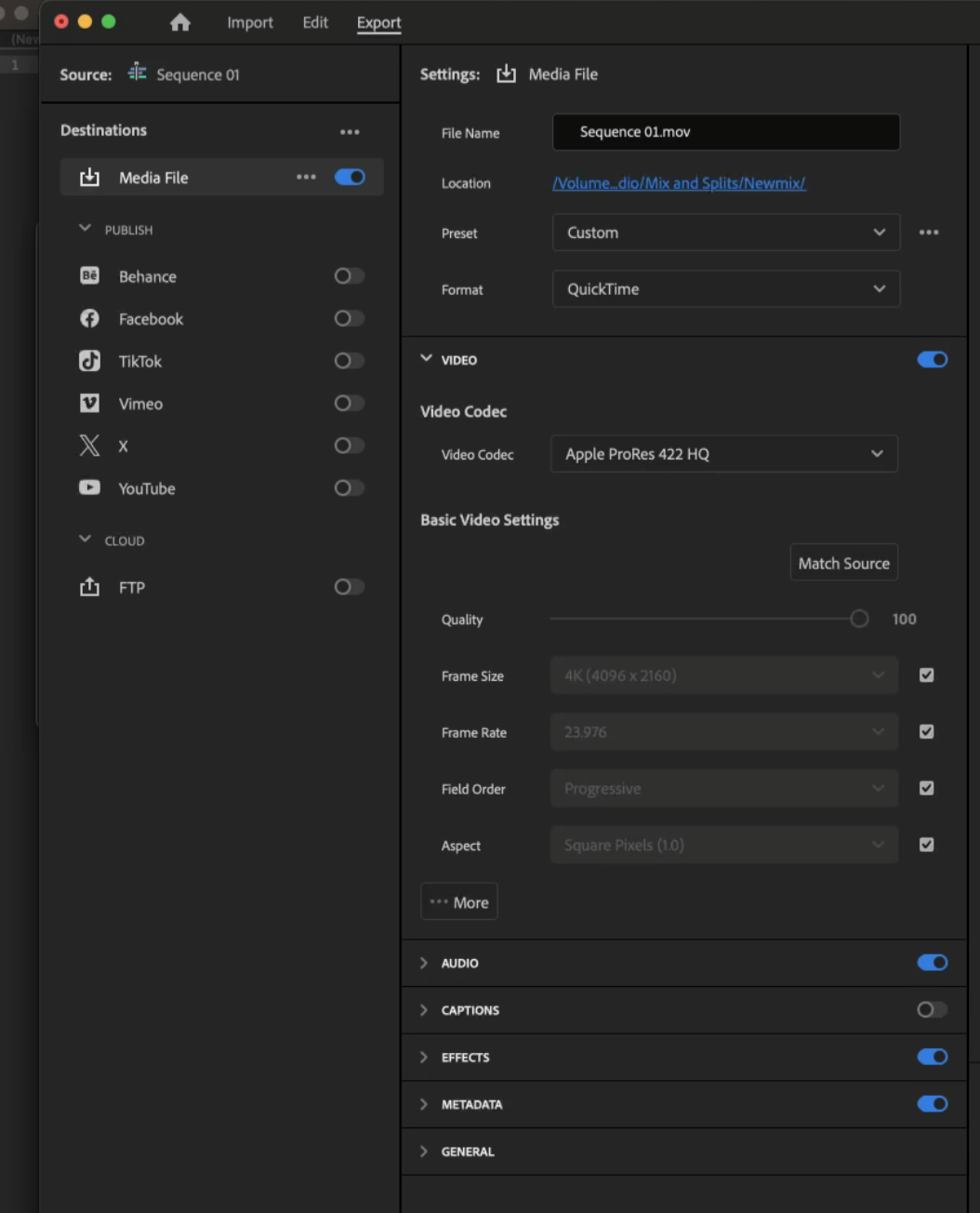
Premiere Pro: Export tab with QuickTime / ProRes 422 HQ and Match Source.
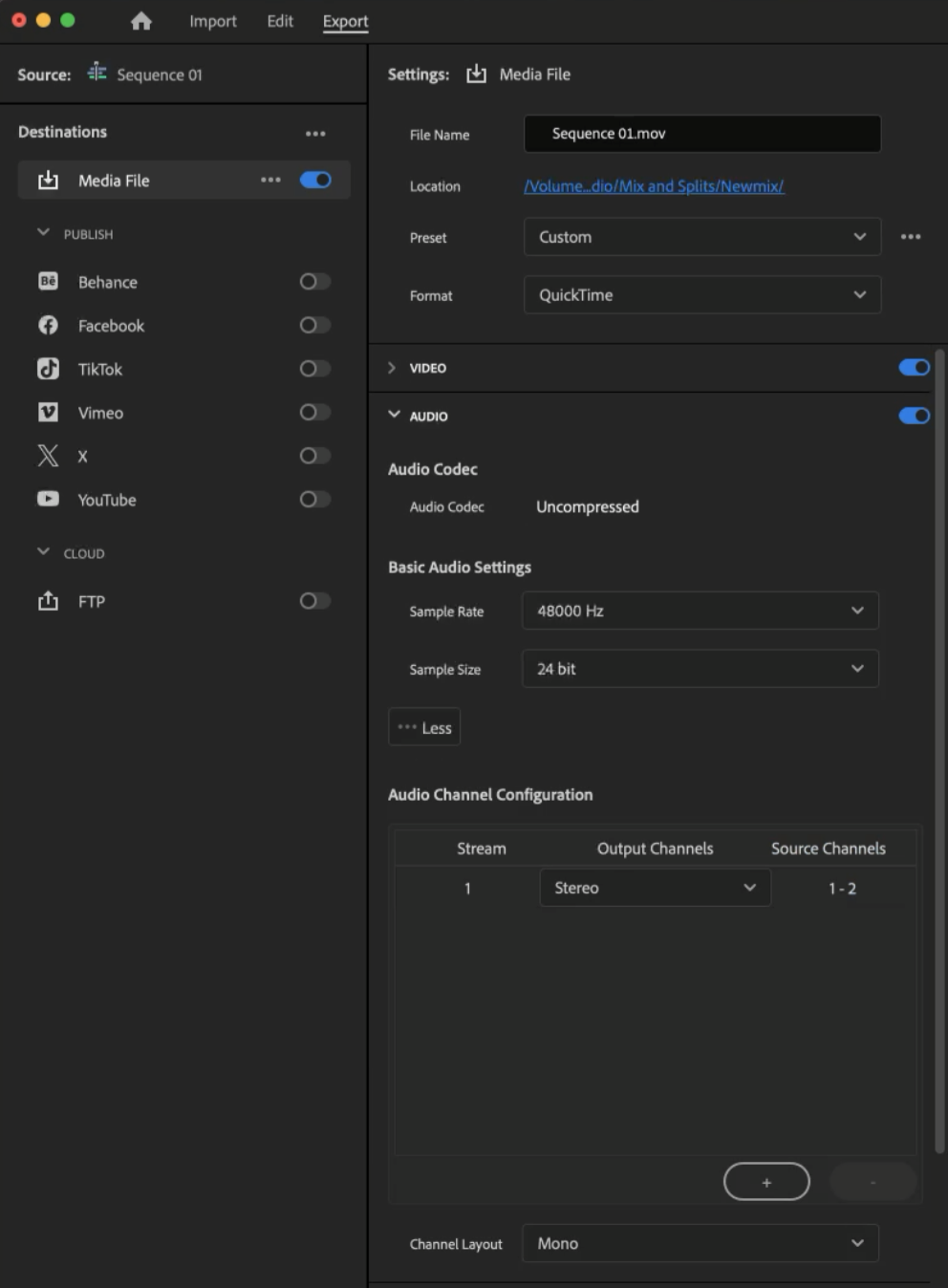
Premiere Pro: one audio stream, Output Channels set to Stereo, uncompressed 48 kHz / 24-bit.
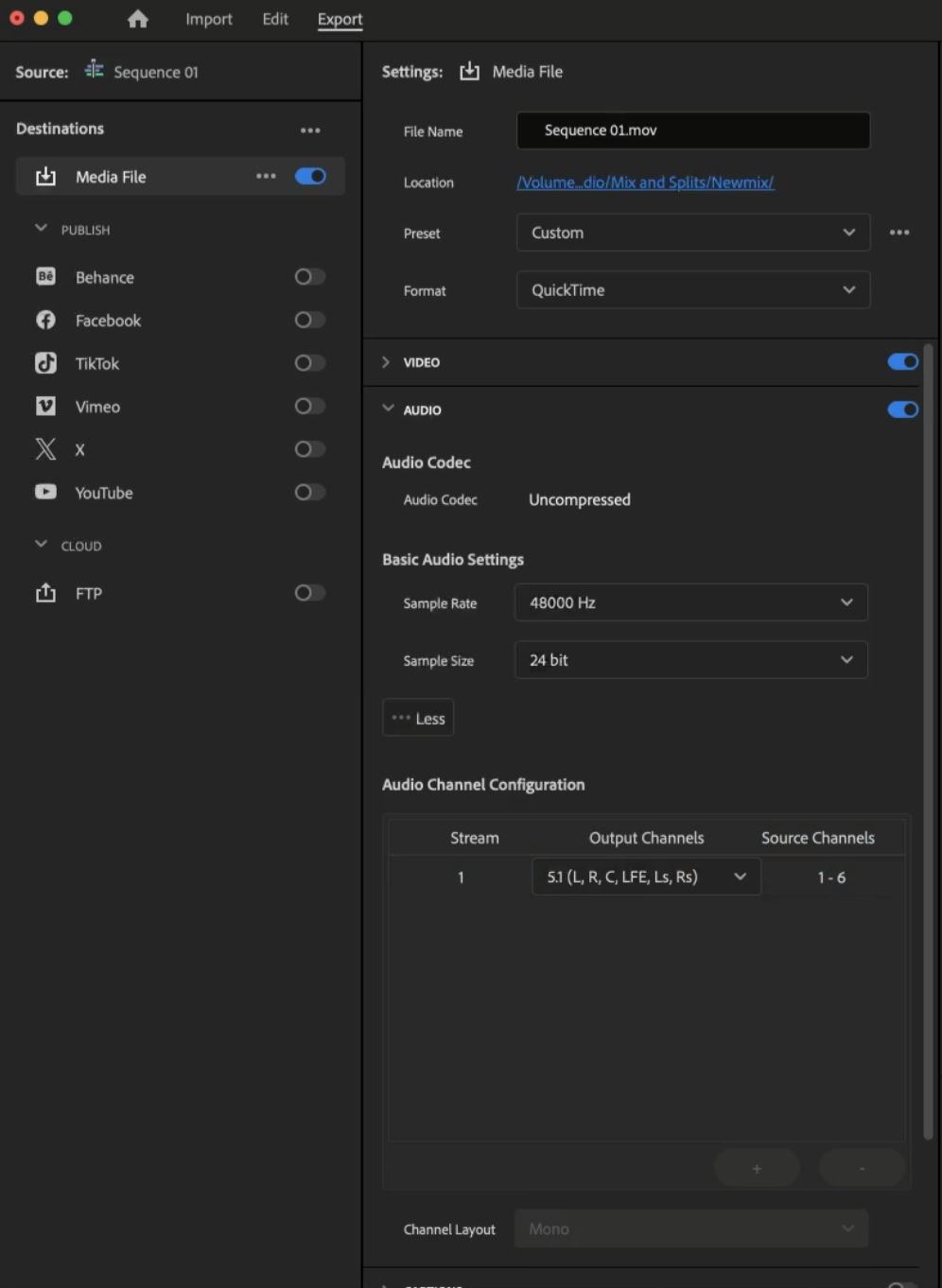
For a 5.1 mix: still one stream, with Output Channels set to 5.1. Never one stream per mix track.
DaVinci Resolve export settings
- Open the Deliver page and choose the Custom Export preset.
- Render: Single clip.
- Video tab: Format QuickTime, Codec Apple ProRes, Type Apple ProRes 422 HQ. Resolution and frame rate match your timeline.
- Audio tab: Codec Linear PCM, Sample Rate 48000, Bit Depth 24.
- Leave “Render one track per channel” and “Render as discrete audio tracks” unchecked, and set Output Track 1 to your stereo or 5.1 bus, so the audio exports as one interleaved stream. Checking either box writes each channel or track as its own mono stream, and that's the most common reason an upload bounces.
- If your film has subtitles, set Subtitle Settings to Burn into video.
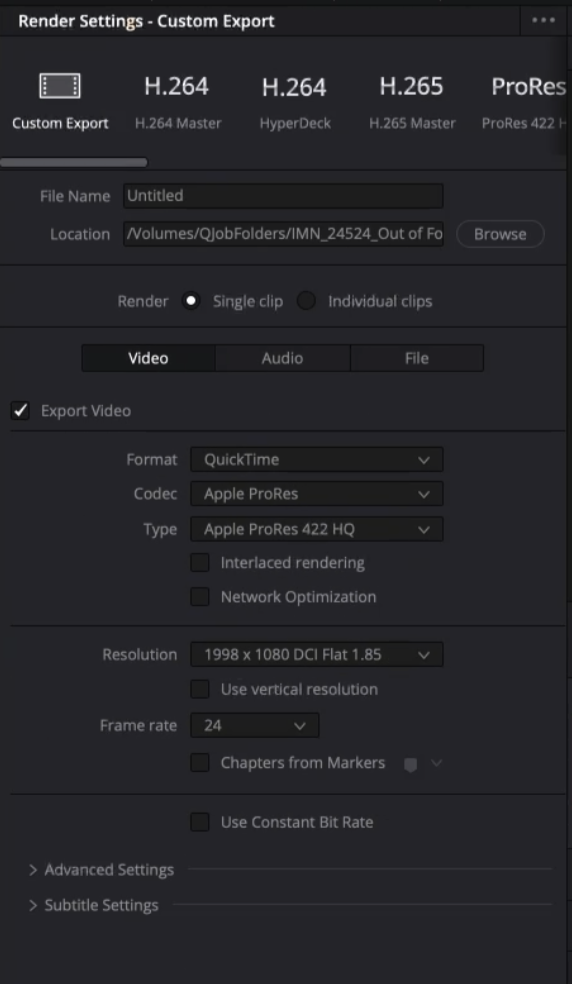
Resolve: Deliver page video settings with QuickTime / ProRes 422 HQ, rendered as a single clip.
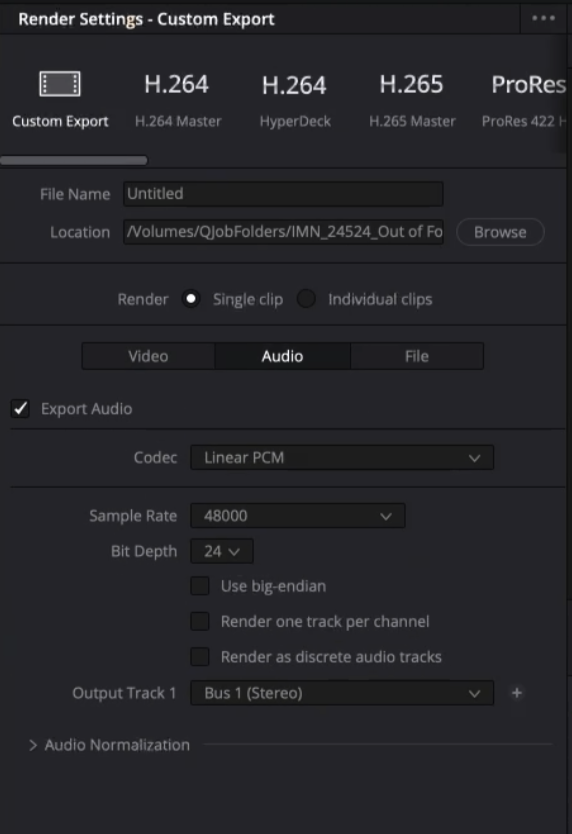
Resolve: one stereo output track. Both per-track render checkboxes stay unchecked.
Custom DCP: full delivery specs
Custom DCPs are mastered by our engineers, so delivery is more flexible: surround mixes can arrive as separate audio files, and unusual formats are workable once we've talked them through. Slates, bars and tone, and countdowns are not necessary and should not be included; deliver the program only, starting on the first frame of picture.
Picture requirements
- The final DCP is authored at one of the standard DCP aspect ratios: 1.85:1 (Flat) at 1998×1080 in 2K or 3996×2160 in 4K, or 2.39:1 (Scope) at 2048×858 in 2K or 4096×1716 in 4K.
- Whatever aspect ratio you deliver, we fit your picture into whichever container fits it best, flat or scope, and add pillar- or letter-boxing to fill the frame. We never crop your film. A 16×9 master (1920×1080 or 3840×2160) gets a slight pillar-box in flat.
- Frame rate must be 23.976, 24, 25, 29.97 or 30 fps. For projects finished at 23.976 using the InterOp standard, there is no need to convert to true 24 fps. Cinematiq handles the conversion (and audio pullup) during authoring.
- Color can be encoded as Rec-709, DCI-P3, or XYZ. If delivering in a colorspace other than Rec-709 (the default for HDTV), label the file clearly and note the gamma levels.
Preferred picture formats
- QuickTime movie, encoded as Apple ProRes 422 or another standard professional codec such as 10-bit uncompressed. A different codec may cause delays or color shifts, so contact us first if you're planning on one.
- Stereo audio must be embedded in the QuickTime.
Audio requirements
- Multi-channel audio such as 5.1 surround can be delivered as discrete mono files, clearly labeled with a channel assignment in SMPTE order (L, R, C, LFE, Ls, Rs), and matching the picture's frame rate. If your tool mixes in film order (L, C, R, Ls, Rs, LFE), label the files explicitly.
- These files must be the exact same length as the picture.
- LFE channel audio should be low-passed (roughly 24–48 dB roll-off above 125–160 Hz) so unwanted frequencies never reach venues without low-pass filters in-line.
Preferred audio formats
- WAV, 24-bit, 48 kHz, matching picture frame rate
- AIFF, 24-bit, 48 kHz, matching picture frame rate
Questions about your specific master? Email info@cinematiq.com before you export.