
Things to Consider Before Making a DCP: Color

 Original vs gamma adjusted image
You’ve spent a ton of time color grading your film so that it has a particular look. Now it’s time to make sure that the audience sees the same look as you intended when the film is projected on the big screen. This is where things get a little technical. Digital Cinema uses a much different gamma value and color space than what’s used in the video world. While it’s easy to get overwhelmed by fancy terms and confusing numbers, the takeaway is surprisingly easy to understand.
What is Gamma?
Gamma and gamma correction is a very complex mathematical concept that works to best encode images by taking into account how our eyes work. At a high level, Gamma is a function that takes the luminance range in an image and turns it into brightness when it is displayed. Gamma values describe a curve that maps mid-range tones.
Gamma is primarily related to encoding an image for display, and different computer platforms and TVs all have different default display gammas. The majority of gamma values fall between 2.2 and 2.4. Before OS X 10.6 Snow Leopard, Apple used a default display gamma value of 1.8. CRT televisions used a gamma of 2.2, and Windows systems use gamma values ranging from 2.2 to 2.5. Most modern flatscreen televisions use a gamma value of 2.4. Cinema, on the other hand, uses a gamma value of 2.6.
If the value used to encode the video is not the same as the display gamma value, the image will appear either slightly darker than it should, which will “crush” the blacks and lose detail in the shadows, or slightly brighter which will lower contrast, as well as make darker colors appear washed out and “milky”.
Color Space
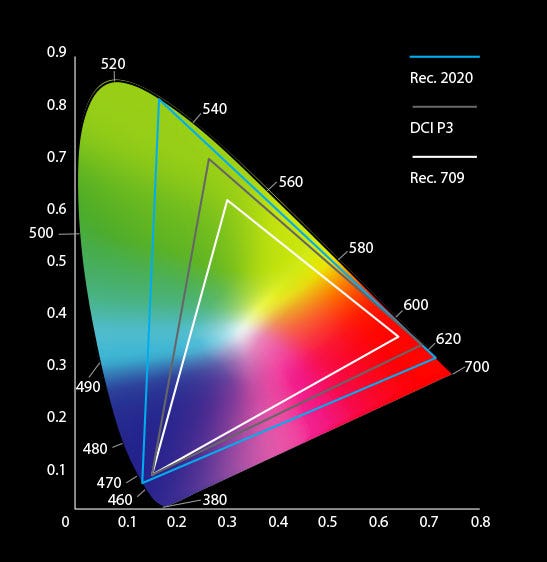 HDR (Rec.2020), DCI P3 and HDTV (Rec.709) gamut comparison
While video is typically encoded in either a Y’CbCr, RGB or sRGB color space, DCPs use the X’Y’Z’ color space (described in CIE Publication 15:2004, Colorimetry, 3rd Edition). This is typically abbreviated as XYZ. This space is used because it most closely represents the color gamut available on traditional film-prints.
One way to arrive at this color space is to perform the final color grade in this space. This is the way Hollywood studios grade their films to achieve the highest-quality DCP. But for many films, a theatrical DCP is not the primary output format, but one of many deliverables necessary. In these cases, a more economical workflow is to grade in a video color space meant for video monitors like Rec.709, then perform the color conversion during the DCP encode process.
Converting for DCP
To perform the color conversion from a video color space to the cinema color space, a lookup table (LUT) is used. This process takes the color value from the source space and translates it to the corresponding value in the destination space, taking into account the change in gamma. DCP creation software has built-in tools for handling this common color and gamma conversion. It is worth noting, however, that to perform an accurate color conversion, the exact parameters of the source material need to be known. Otherwise, unintended issues such as washed-out blacks can occur.
Takeaway
When color grading your film, ask your colorist what gamma value and color space is being used and communicate that to the person or company creating your DCP.
Color Bit Depth
While we’re at it, we should talk a bit about how many colors are stored in digital image files. Colors stored digitally are described on a per-pixel basis. That is to say, how many color values can each pixel display? Since there are three primary colors used in displays, we use the term “bits per channel” or BPC to describe how many colors can be displayed. Common bit depths in video are:
- 8-bit (2⁸ or 256 colors per channel) = millions of colors
- 10-bit (2¹⁰ or 1024 colors per channel) = billions of colors
- 12-bit (2¹² or 4096 colors per channel) = trillions of colors
- 16-bit (2¹⁶ or 65,536 colors per channel) = trillions of colors
It should be noted that in most applications like QuickTime or Adobe products, when you see “Trillions of Colors” it usually means 16bit per channel.
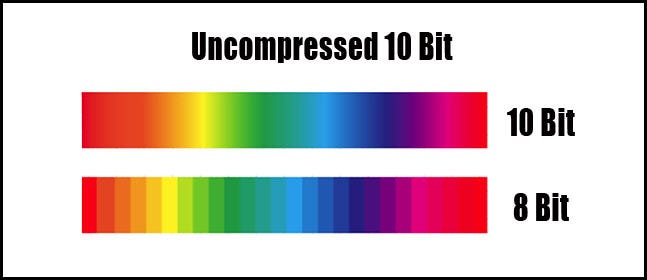 8 bit vs 10 bit color ramp shows the difference the extra colors make in smooth gradients.
Digital Cinema uses 12bit per channel encoding, which means that it supports a really wide range of colors. To take advantage of that, you’ll want to keep as many colors as possible in your image right up until the JPEG 2000 encoding process used to convert your images for DCP. Apple’s ProRes codecs are a good choice for this as they are 10bit codecs and will give you a large amount of colors while conserving disk space.
Hollywood often uses image sequences using 16bit TIF files to deliver films for DCP mastering. But considering that a 120min feature length film at the Flat aspect ratio of 1998x1080 would require 172,800 frames at 13MB/frame for a total size of 2.2TB, most independent films use ProRes or similar compression type to save space. The same 120min film as a ProRes 422HQ file would only take ~163GB. Delivering content for DCP using 8-bit color is always a bad idea as when projected on a large screen, you might be able to see “banding” or hard lines between colors in gradients. This is most often seen in scenes featuring the sky or graphics containing smooth gradients.
About Cinematiq: We’re a digital motion picture lab based in San Francisco specializing in video encoding and DCP creation. Our team of technicians and video specialists work to make sure that your vision ends up on screen the way it was intended. Whether you are a filmmaker, festival or distributor, we’ve got solutions to some of the most challenging problems in the motion picture industry today. We’re also the creators of DCP Transfer, a software application that allows you to easily format hard drives using the ext2 filesystem for DCP Delivery, as well as view DCP info / metadata.