
Drive failed to re-mount after formatting
This is the most common DCP Transfer problem, and it almost always means macOS hasn't loaded Paragon ExtFS. DCP Transfer formats the drive as EXT2, then needs Paragon to mount it again. If macOS is blocking Paragon's system extension, the format succeeds but the drive never comes back.
Other signs of the same cause:
- The drive disappears after formatting.
- The destination drive is greyed out.
- Paragon ExtFS shows a Retry button that never succeeds.
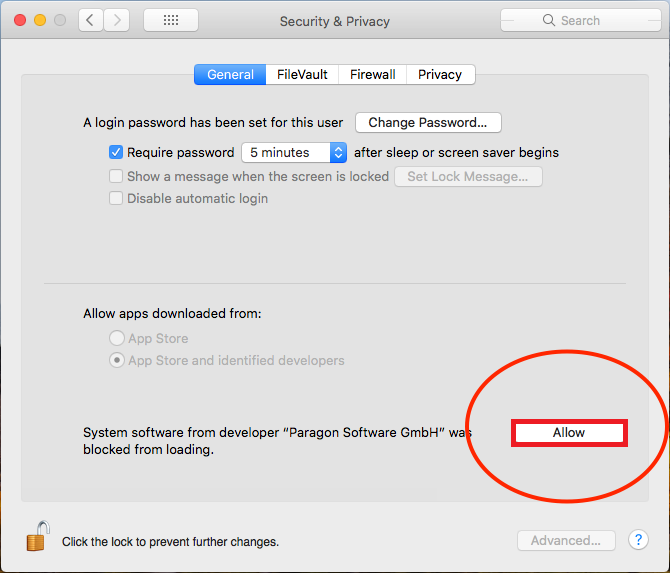
- There's no Allow button in Privacy & Security.
The fix
Work through these in order. Each one is covered step by step in Installing DCP Transfer.
- Apple Silicon Macs (M1 and later): start up in Recovery and set Reduced Security with Allow user management of kernel extensions from identified developers checked. Without this, macOS never offers the Allow button. This is the step most people miss.
- Allow Paragon's extension: in System Settings > Privacy & Security (or System Preferences > Security & Privacy > General on Monterey and earlier), click Allow next to the message about Paragon Software GmbH, then restart.
- Full Disk Access: make sure both DCP Transfer and Paragon ExtFS (com.paragon-software.extfsd) are turned on under Privacy & Security, then Full Disk Access.
- Restart the Mac, open DCP Transfer, and try the format again.
Still failing?
You may have an older Paragon build left over from a previous install, which won't load on current macOS. Follow Reinstalling DCP Transfer cleanly, then repeat the steps above.
If that doesn't work, email support with the details listed in Contacting DCP Transfer support so we can pick it up right away.